

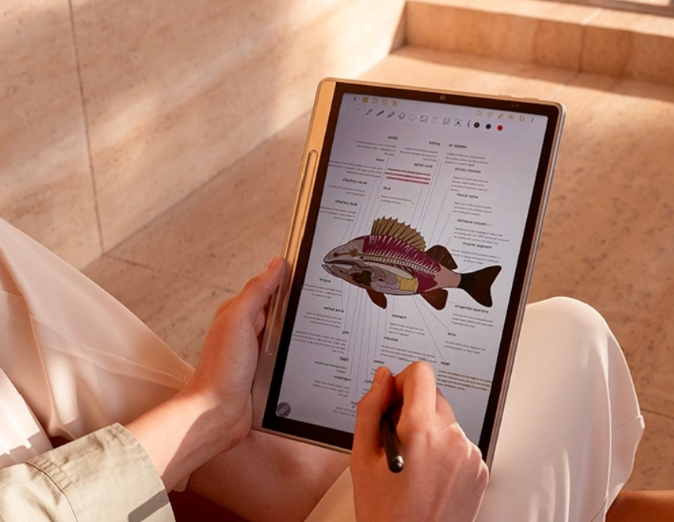
Digital writing tablets have completely transformed the note-taking and creative processes by offering a modern alternative to traditional paper. These devices usually blend the natural feel of writing with digital features like using a stylus, easy organization, and searchable notes that make them stand out. Unlike traditional paper, where mistakes are hard to erase, digital tablets allow for instant erasure and editing.
Many models of paper tablets come with a syncing system ensuring your notes and sketches are always accessible across different devices with the reduced risk of loss. It not only improves your workflow but also makes note-taking easier.
The XPPen Magic Note Pad has had a massive impact on the productivity of students, professionals, and creatives. It provides you with the familiar sensations of pen-on-paper with the addition of powerful features that will elevate your creativity and make you more organized through its digital precision.
For students, paper tablets often work as a clutter-free way to keep track of their lecture notes, while professionals can use it to interpret documents and keep meeting notes neatly written. Artists and creatives love the Magic Note Pad’s precise stylus and color options, making it excellent for their work.
What Makes XPPen Magic Note Pad Stand Out?
The XPPen Magic Note Pad stands out among many writing tablets by combining cutting-edge display technology, a 16k sensitivity stylus with a smooth 90Hz refresh rate, and an easy-to-use note-taking app. These features combine to create an exceptional paper tablet experience for all users.
Most digital writing tablets use black-and-white e-ink screens, which are great for reading but hold you back from experimenting and being creative. The XPPen Magic Note Pad changes the game with its 3-in-1 color screen, offering a more bright and versatile experience to its users. Students can highlight information on their e-textbooks and notes with various color and size options, making studying interactive and easier for them.
Professionals can annotate their documents in different colors, which helps them stay organized, come up with ideas, and give feedback more clearly. Artists benefit the most with XPPen Magic Note Pad as the color display allows for sketching, painting, and even light photo editing, something that’s not possible with black-and-white screens.
The XPPen Magic Note Pad has three color modes, including Nature Color Mode for a bright and rich display. Light Color Mode allows your eye to relax with its reduced eye strain colors. Lastly, Ink Paper Mode imitates a traditional e-ink screen.
Additional Features
While most paper tablets come with styluses offering 4K or 8K pressure sensitivity, which is decent, the XPPen Magic Note Pad stands out with its 16K pressure-sensitive stylus. Through this sensitivity, the stylus becomes more responsive to even the slightest touch.
Artists greatly benefit from this as it allows them to have major control over their creative pieces, allowing for better detailing, smoother shading, bold lines, and overall a more natural drawing experience. Note-takers also benefit from this paper tablet as it helps the pen capture handwriting with impressive accuracy, making digital notes feel like writing on real paper.
Many paper tablets are known to have slower refresh rates, like 60Hz or less, which causes delays or ghost touch sometimes. The XPPen Magic Note Pad boasts a 90Hz refresh rate, which ensures a smoother and responsive experience as well. This helps students make quick notes and artists enjoy a smooth experience.
The XPPen Notes app goes beyond typical note-taking apps with its powerful features, including Cloud syncing, handwriting-to-text conversion, search functions, and PDF annotation. With features like these, this paper tablet stands out compared to others.
Who Needs XPPen Magic Note Pad?
While everyone needs an XPPen Magic Note Pad, some especially do, including students. If you are a college student, this paper tablet can easily replace all of your notebooks. Instead of carrying heavy and multiple notebooks to take notes for different subjects, you can store everything in one place with this tablet.
You can not just write on it but draw diagrams for your science and math projects, highlighting important points with various colors. You can also organize your studies better without ever having to worry about losing papers or running out of pages.
For professionals, the XPPen Magic Note Pad is a game-changer as well. You can take quick notes during the meetings, write directly on digital documents, and share your ideas with the team instantly.
It’s also useful for brainstorming since this paper tablet lets you jot down ideas without wasting any paper. With cloud syncing, you can easily access your notes from different devices, which makes your work smoother and more efficient than ever. If you are fond of art and design, this tablet is an amazing tool!
Its special pressure-sensitive pen lets you design thin strokes, lines, and dark and bold as well. This makes it perfect for sketching and creating detailed masterpieces on the go. Since the paper tablet is thin and portable, you can carry it anywhere you go and work on your art anytime, anywhere.
XPPen Magic Note Pad vs. Traditional Alternatives
1. reMarkable 2
reMarkable 2 is hailed as one of the best writing tablets in the world thanks to its affordable price tag, a respectable display and overall appealing specifications. While it has a good pen pressure sensitivity, which makes it a great table for writing, the 8GB storage is where it loses a lot of its aura,
2. BOOX Note Air 3
The BOOX Note AIr 3 provides a 10.3 inches of display with a Wacom EMR stylus that is known for its amazing durability and precision. However, this is one of the tablets that has the lowest screen resolution, which is why it isn’t the perfect contender on our list.
3. Amazon Kindle Scribe
Kindle Scribe is another overall amazing writing tab for note-taking, but with Magic Note Pad’s 16K levels compared to Kinda’s 4096 levels, it cannot compete with Magic Note in terms of digital note-taking.
All in all, while there are many areas where these other tablets shine, if you’re looking for the perfect balance between a price tag and an amazing specifications list, then the Magic Pad is the perfect digital note-taking tab for you.
Conclusion
In 2026, the XPPen Magic Note Pad outshines others and stands out as the top writing paper tablet because it blends the familiar feel of writing on paper with powerful digital tools. Its vivid color screen will enhance your learning, working, and creativity. With its accessories like the super-sensitive pen, you can do precise drawing and even natural writing.
It creates a smooth and lag-free experience while featuring a rich note-taking app, keeping everything organized and accessible as well. So, whether you are a student, an artist, or an office worker, the XPPen Magic Note Pad has so much to offer to you with its versatile way to capture your ideas digitally. It’s a smart purchase for you in today’s tech landscape.
FAQs
What is the best tablet for writing notes?
The XPPen Magic Note Pad is undoubtedly a strong contender among the best tablets for writing notes and offers a paper-like feel and advanced components.
What tablet can write notes on like paper?
The XPPen Magic Note Pad is designed to create the feel of writing on real-time paper, thanks to its X-paper display and grainy surface.
What is the difference between a digital notebook and a tablet?
While a simple tablet can do many things, a digital notebook like the XPPen Magic Note Pad stands out as it is specifically designed for reading, writing, designing, and note-taking. With the focus on a paper-like experience and long battery life, the Magic Note Pad will take your productivity to the next level.
Can I use the XPPen Magic Note Pad for drawing?
Yes! The 16K pressure-sensitive pen makes it ideal for sketching and digital illustrations. The high refresh rate ensures smooth, lag-free strokes. It’s becoming an ideal pick for artists with its ability to create thin lines, smooth shadings, and bold strokes.
Does it support handwriting-to-text conversion?
Yes, the XPPen Magic Note Pad supports handwriting-to-text conversion with its Notes app. It supports over 50 languages. So, if you want to convert your rough writing into text, the XPPen Magic Note Pad has got you covered.
How does the stylus compare to other writing tablets?
The XPPen stylus offers 16K pressure sensitivity, outperforming most competitors in precision and natural writing feel.
